Account Setup
Welcome to the Library catalog! Use it to search for your next favorite book or movie, place and check the status of your holds, discover the newest items on our shelves, and much more.

Register for an Account
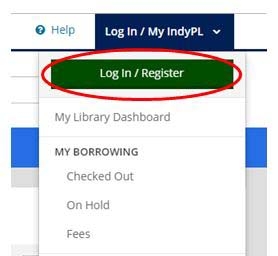
Go directly to the Library catalog or choose Browse Catalog from the top of any page on the Library's website. Click on "Log In / My IndyPL".

Click on the green "Log In / Register" button.
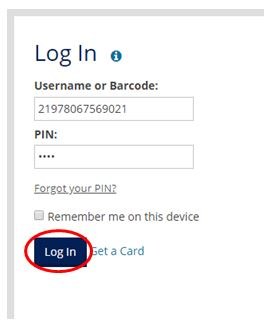
Enter Your Library Card Barcode
On the Log In screen, enter your complete Library barcode (including the 219780) and PIN. Click the "Log In" button.
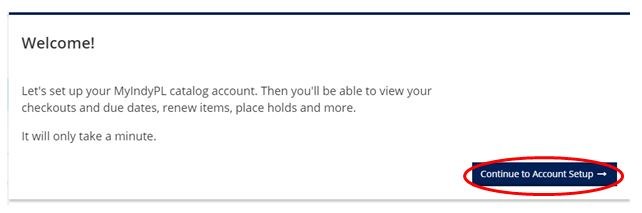
The Welcome screen will appear, click on "Continue to Account Setup."
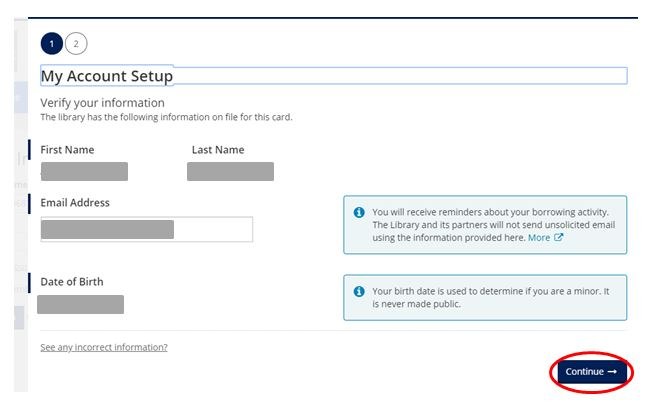
Verify Your Information
Verify your information and click “Continue”. If you have provided the Library with your email address it will appear below, if you have not provided your email address, you may add it here OR continue without an email address.
Create a Username and Accept Terms of Use
Create a username and accept the terms of use. Click "Complete Account Setup".

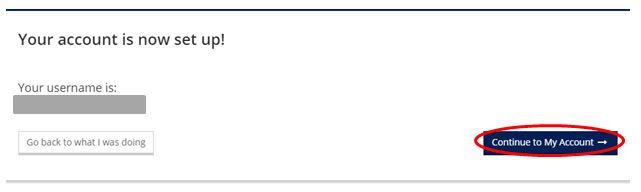
You will receive confirmation that your account has been created. If you provided an email address, you will also receive an email notification that your account was created. Click "Continue to My Account".
Welcome to Your New Catalog!

Need help? Ask a Library staff member at any of our locations or call, text or email Ask-a-Librarian.
Frequently Asked Questions (FAQ)
What is borrowing history?
If you would like to enable your borrowing history, you now have the option to do so! This will begin to keep track of materials you have checked out and returned to the Library. You can turn this off at ANY time or choose to enable at a later date.
What other the additional settings can I choose?
These items can also be changed in My Settings at any time.
- Preferred browsing language
- Preferred library location(s)
- Community content
Do you have questions about our website, online catalog, research tools, or download & streaming?
Our Website Administrator knows the answers!
Contact the Website Administrator